










-
Type
- Dante
- Networking
- Control
-
System Management
- Composer Management Software
- SymVue Screen Authoring
- AV-Ops Center Remote Monitoring
- ARC-WEB Control Interface Signal Processing
- D100 AVoIP DSP Server
- Radius NX AVoIP DSP
- Prism AVoIP DSP
- Edge AVoIP DSP
- DSP I/O Expansion Cards
- Jupiter DSP
- Zone Mix 761 DSP I/O Connectivity
- xIO Bluetooth Endpoints
- xIO XLR Endpoints
- xIO AVoIP DSP Audio Expanders Control Systems
- T-Series Touchscreen Controllers
- W-Series Controllers
- Control Server for Personal Devices
- xControl GPIO Expander
- ARC-Series Controllers
Composer Push, Pull, and Sync
Product:Composer Management Software
Type: Control
The purpose of this document is to provide updated information on the Push, Pull, and Dante Device Sync features for Composer 6.0 and later.
When pushing a Site File to a system with versions of Composer prior to 6.0, Composer would configure the Dante routing and naming of all the devices in the Site File. When pulling a Site File, there were two options; Synchronize to Changes or Abandon Changes. These were all the run-time changes made since the last time that the Site File was archived. Choosing “Yes” would bring those changes into Composer. Choosing “No” would bring the archived Site File into Composer as it was last archived.
Each section below explains how the features are currently handled.
Push
When pushing, Composer can either configure the network audio (Dante) or let Dante Controller manage it.
Composer’s Site Preferences window contains a check box to Configure Network Audio. When the box is checked, Composer will configure the network audio routing and naming. If the box is unchecked, all network audio routing and naming is managed with Dante Controller.
Push
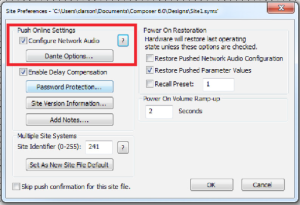
By default, the Site Preferences window will automatically open for push confirmation. Site Preferences are also located in the Tools menu.
Pull
When pulling a Site File from an existing system into Composer, there are two options; Synchronize to Changes or Abandon Changes.
It is common to modify events and/or control positions while the system is online and since the Site File was last archived (pushed). If the file is open without choosing to synchronize to these changes, the file pulled will not reflect the exact state of the online system. The pulled file will be a copy of what was last archived.
Here is a list of all the options that may be selected when synchronizing changes. All options are selected by default.
Pull
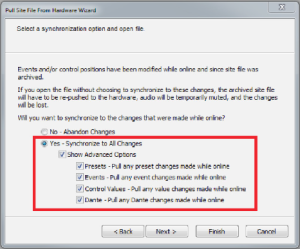
- Presets
- Events
- Control Values
- Dante routing and naming
Dante Device Sync
When locating a Dante device in Composer, there is an option to synchronize the design to the device’s Dante configuration. This sync is performed separately and is not affected by the Configure Network Audio setting in the Site Preferences.
Here is a list of all the options that may be selected when synchronizing changes. Device name and channel labels are selected by default.
sync
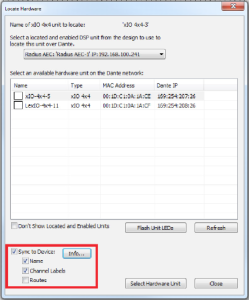
- Device Name
- Channel Labels
- Routing/Subscriptions
confirm
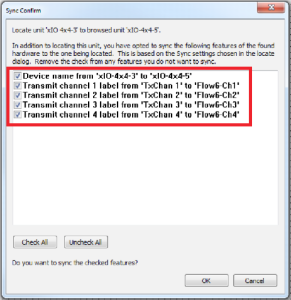
Once the Dante hardware has been selected, the Sync Confirm window will open. From this window you may choose which specific features of the located hardware are synced with Composer. All features are selected by default. Remove checks from any unwanted sync features.