










-
Type
- Dante
- Networking
- Control
-
System Management
- Composer Management Software
- SymVue Screen Authoring
- AV-Ops Center Remote Monitoring
- ARC-WEB Control Interface Signal Processing
- D100 AVoIP DSP Server
- Radius NX AVoIP DSP
- Prism AVoIP DSP
- Edge AVoIP DSP
- DSP I/O Expansion Cards
- Jupiter DSP
- Zone Mix 761 DSP I/O Connectivity
- xIO Bluetooth Endpoints
- xIO XLR Endpoints
- xIO AVoIP DSP Audio Expanders Control Systems
- T-Series Touchscreen Controllers
- W-Series Controllers
- Control Server for Personal Devices
- xControl GPIO Expander
- ARC-Series Controllers
Making a Latched Button Act like a Momentary Button
Product:Composer Management Software
Type: Control
Occasionally, third party devices may need a control signal to last longer than a momentary button’s “press” to activate, but not as long as a press and hold situation. This Tech Tip explains how to get a latched button to act like a momentary button.
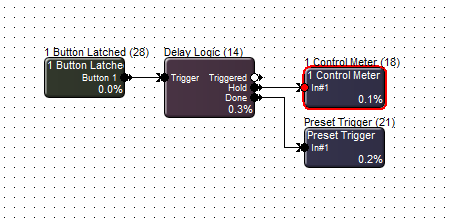
First, drag in a 1 Button Latched (can be multi-button), Delay Logic, and a Preset Trigger, and wire them as shown.
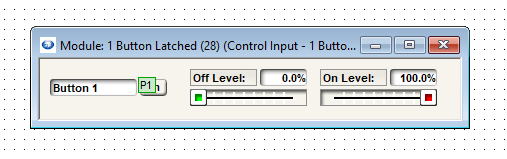
Set the latched button, in its OFF state, to a preset. In this example, we’ll use Preset #1.
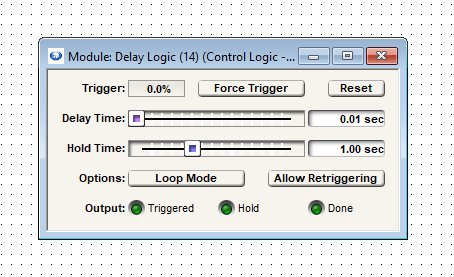
Next, set the Delay Logic’s delay time to 0.01 sec and the hold time to an appropriate time for your system. This example leaves the hold time at the default 1 sec.
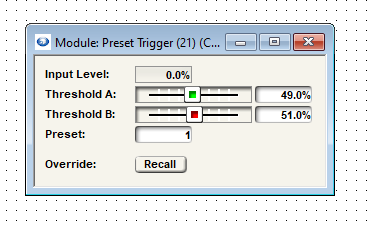
In the Preset Trigger module, the default number will be 1, but change this to the preset used for the latched button in its OFF state.
Push and go online, and test the latched button by pressing it. It should return to the OFF state after the Delay Logic hold time has elapsed, firing through the Done stage output.