












-
Type
- Dante
- Networking
- Control
-
System Management
- Composer Management Software
- SymVue Screen Authoring
- AV-Ops Center Remote Monitoring
- ARC-WEB Control Interface Signal Processing
- D100 AVoIP DSP Server
- Radius NX AVoIP DSP
- Prism AVoIP DSP
- Edge AVoIP DSP
- DSP I/O Expansion Cards
- Jupiter DSP
- Zone Mix 761 DSP I/O Connectivity
- xIO Bluetooth Endpoints
- xIO XLR Endpoints
- xIO AVoIP DSP Audio Expanders Control Systems
- T-Series Touchscreen Controllers
- W-Series Controllers
- Control Server
- xControl GPIO Expander
- ARC-Series Controllers
Green Ethernet/IEEE Protocol/Energy-Efficient Ethernet
Type: Networking
Overview
Energy-Efficient Ethernet is a set of enhancements to the twisted-pair and backplane Ethernet family of computer networking standards that allow for less power consumption during periods of low data activity. The intention was to reduce power consumption by 50% or more, while retaining full compatibility with existing equipment.
The Institute of Electrical and Electronics Engineers (IEEE), through the IEEE 802.3az task force developed the standard. The first study group had its call for interest in November 2006, and the official standards task force was authorized in May 2007. The IEEE ratified the final standard in September 2010. Some companies introduced technology to reduce the power required for Ethernet before the standard was ratified, using the name Green Ethernet.
The power reduction is accomplished in a few ways. In 100 Mbit/s, 1 gigabit and 10 Gbit/s speed data links, energy is used to keep the physical layer transmitters on all the time. If they could be put into “sleep” mode when no data is being sent that energy could be saved. By sending a low-power-idle (LPI) indication signal for a specified time the transmit chips in the system can be turned off. LPI is sent periodically to refresh the sleep mode. When there is data to transmit a normal idle signal is sent to wake the transmit system up before data is due to be sent. The data link is considered to be always operational, as the receive signal circuit remains active even when the transmit path is in sleep mode.
In addition to the link load power savings of Energy-Efficient Ethernet (EEE), Green Ethernet works in one of two ways. First, it detects link status, allowing each port on the switch to power down into a standby or “sleep” mode when a connected device, such as a computer, is not active. Second, it detects cable length and adjusts the power accordingly. Previous standard switches provide enough power to send a signal up to 100 meters (330 ft).
Be sure to disable Energy Efficient Ethernet (EEE). EEE reduces device power consumption when network traffic is low. Switches that support EEE will automatically adjust their respective power-saving settings so that they match, but some switches do not perform this mutual adjustment properly. It can be said that EEE is incompatible with real time applications, such as audio or video streaming, which can lead to degraded clock synchronization and audio interruption.
Disable any EEE features on any network switch Dante will run on. Dante and EEE are not compatible.
Disabling EEE
In the example below, a Cisco SG300 is used to demonstrate how to disable the EEE function.
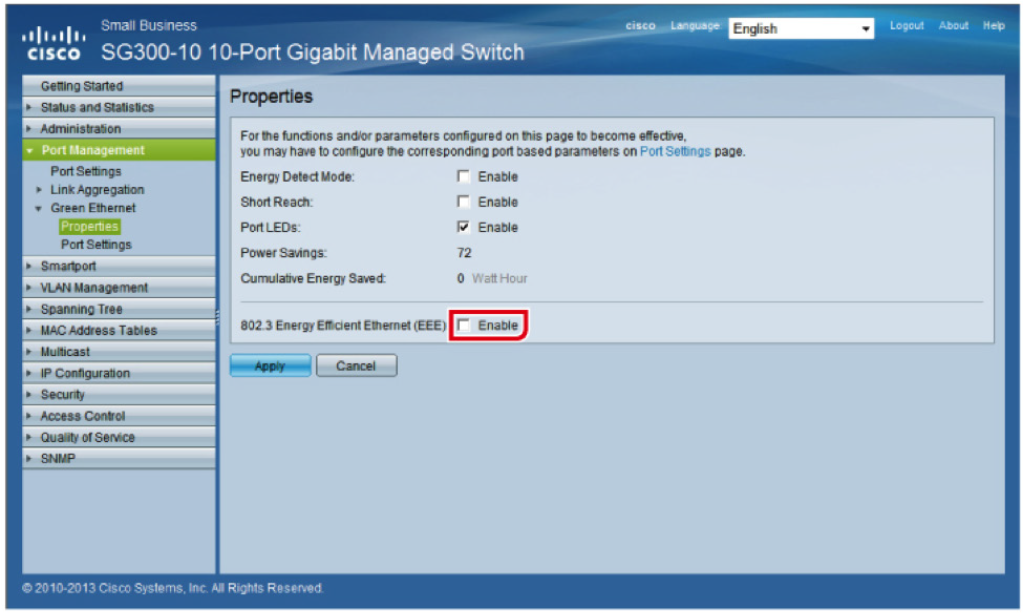
- To access the switch by using the web-based interface, you must know the IP address the switch is using. The switch uses the factory default IP address of 192.168.1.254 by default.
- Enter the default login information:
- Username is cisco
- Default password is cisco (passwords are case sensitive)
- Select “Port Management” from the menu on the left
- Select “Green Ethernet”
- Select “Properties”
- Clear the “802.3 Energy Efficient Ethernet (EEE)” check box
- Click “Apply”.